

Copy Trading FAQ
Digital Marketing
Price: ₹500 + 18% GST per account per month.
Please note, that the Master Client ID is also considered as one account. So, at a minimum, you need to purchase one Master account and one Child account, which totals ₹1000 + 18% GST per month.
Discount Model:
- Upto 10 A/Cs: No Discount
- 11-50 A/Cs: Flat 10% Discount
- 51+ A/Cs: Flat 15% Discount
While we don’t offer free trials, we do understand that getting started with our service may require some support. That’s why we recommend purchasing a minimum one-month subscription with one master account and one child account. This ensures you have all the tools and assistance you need to fully experience the value of our service. The cost for this comprehensive package is just ₹1000 + 18% GST, offering great value for the benefits you’ll receive.
You have the flexibility to use different brokers for both master and child accounts. You can even opt for a different broker for each child’s A/C account if you prefer.
Copy trading is an efficient way to manage multiple broker accounts in real-time.
When you decide to buy or sell something using your MASTER account, whether through a website, mobile app, or special software, our copy trading system swiftly replicates those actions across all your other CHILD accounts.
You can customize how much Quantity gets copied into each account by setting a multiplier. So, whether you’re trading manually or using algo tools, our copy trading system keeps all your accounts in sync.
Normally, if you’re manually trading across multiple accounts, you’d have to place orders and calculate quantities for each account individually, which consumes a lot of time and divides your focus from trading itself. With copy trading software, you only need to work on a single account. The software will automatically place orders into your other accounts, determining the quantity for you. This allows you to concentrate solely on your trading activities.
There’s no limit on the number of orders to be copied. Our system will efficiently copy all the orders you place, ensuring seamless execution of your trading strategy.
There is no limit on A/Cs that can be added. However, please note that the pricing structure is on a per A/C basis.
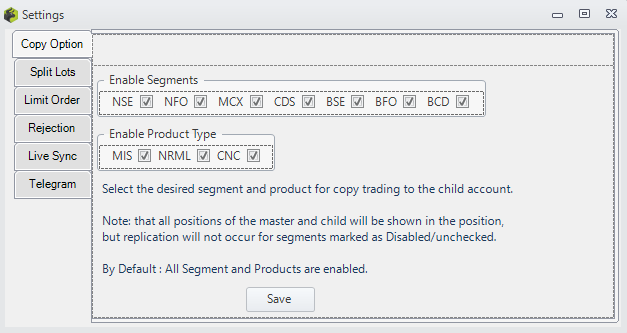
We support the following segments: NSE Equity, NFO Futures, NFO Options, BSE Equity, BFO Futures, BFO Options, and MCX. You have the option to enable or disable each segment. Only orders from the segments you’ve enabled will be copied.
Typically, orders are copied within 1 second. However, the speed may vary depending on the broker API and the infrastructure being utilized (Broker API responding time, Internet Speed, etc..).
There are two types of slippage: one is due to the latency of orders being copied, and the other is slippage due to liquidity. Orders are usually copied within one second. So, if you are using market orders, you may experience some small variation depending on the price movement that occurs within that one-second timeframe. If you place limit orders and all the quantity gets filled, then there won’t be any slippage. However, if there are fewer buyers or sellers available at your ask or bid price, then you may experience some slippage as the software revises the order price to get it filled. Slippages due to liquidity cannot be controlled.
The Copy Trading Software copies orders from your master account, whether they’re manually placed by you or executed through any other Algo.
However, there are certain limitations to consider. If you intend to use the same account for both your Algo and the copy trading software, your broker must allow either multiple API logins or provide multiple APIs.
- For brokers like Finvasia, which allows only one login session through API and doesn't offer multiple APIs, you cannot simultaneously use the Algo and the Copy Trading Software.
- Brokers like IIFL allow only one login session per API but provide multiple sets of APIs. Therefore, you can use different API sets for your Algo and Copy Trading Software to ensure they work concurrently.
- Brokers like Zerodha permit multiple login sessions for the same API, enabling you to use the same API set for both Algo and the Copy Trading Software without any issues.
Yes, you can get alerts (Login, Logout, Order Rejection, Errors, Session expiration, etc..) to the telegram, check the setup guide for copy trading telegram alerts @: https://www.youtube.com/watch?v=-HR0BUCQlTU
Our copy trading software is available as a desktop-based application, giving you the flexibility to install it on your local computer or laptop, or on a cloud machine or VPS (Virtual Private Server).
If you are installing the software on your local PC/Laptop, ensure that you have power backup and a stable internet connection.
When installed on a cloud machine or VPS, you can access the software from anywhere with an internet connection, providing you with convenient remote access to your trading activities.
We prefer a desktop-based application as it has the following advantages:
- Performance: By installing the software locally or on a VPS, you typically experience faster execution speeds compared to web-based platforms. This is because the software runs directly on your machine or a dedicated server, minimizing latency and ensuring swift order processing. In web-based applications, execution happens on a single server of the service provider so it affects the speed of copying.
- Customization: Local installation allows for greater customization options tailored to your specific needs. You can configure the software according to your trading preferences and integrate it seamlessly with other tools or applications you use for trading analysis or management.
- Control: Installing the software on your own machine or VPS provides you with full control over your trading environment. You can manage security settings, data storage, and system resources according to your requirements, ensuring a secure and reliable trading experience. There have been instances in past where the service provider’s website goes down but the execution still happens in the background and in such cases, you are not able to control the software by any means which is very risky.
- Enhanced Stability: In web-based platforms, issues affecting one client can cascade, impacting others due to shared resources while in desktop-based applications it doesn’t happen as you have your own independent software running.
You can use the copy trading software on a free-tier cloud machine, but there are limitations. If you’re managing 1-2 child accounts and placing 5-10 orders daily, the free tier is sufficient. However, as your trading activity increases, upgrading to a paid cloud machine with higher RAM and memory is recommended for improved performance. Think of it like using a small car for short trips with a few passengers. For longer trips and more passengers, larger and more powerful vehicles are needed for better performance.
The Copy Trading software will replicate completed orders as well as pending Limit orders, SL-M (Stop-Loss Market) orders, and SL-Limit (Stop-Loss Limit) orders that are trigger pending. For detailed information on supported order types and modifications, please refer to the guidelines: https://www.myalgomate.com/product/copy-trading-software/#tab-imp-guidelines
Modifying the limit price and trigger price of an order will be copied to other accounts as well. However, please note that quantity modification is not supported. For more detailed information, please refer to the following link: https://www.myalgomate.com/product/copy-trading-software/#tab-imp-guidelines
- You can set different multipliers for each child account.
- If the multiplier is set to 1, it copies the same quantity as the master account.
- Setting the multiplier less than 1, e.g., 0.4, copies 40% of the master's quantity to the child account.
- A multiplier of 3 copies is three times the quantity to the child account compared to the master.
- Decimal values like 0.05, 0.7, 0.9, 1.3, etc., are all valid options.
- However, there are limitations when using fractional/decimal multipliers. Refer to the "Limitations on using A/C multiplier" section herefor details.
You will need to calculate the multiplier value based on the funds available in your A/Cs. For instance, if your master account has ₹5 lakh available and your child accounts have margins of ₹10 lakh and ₹12.5 lakh respectively, you would set the multiplier to 2 for the first child account and 2.5 for the second.
We offer the following options to exit positions:
- Exit all positions of an A/C
- Exit a particular symbol position across all A/Cs
- Exit all positions in all A/Cs
If your algorithm also initiates the exit order and you manually exit using the exit button, it may result in opposite positions being created. Therefore, it’s advisable to first stop copy trading if you intend to use the exit buttons. Make sure to use it wisely so that it doesn’t create any opposite positions.
In the rare case of an issue from the broker’s API or the exchange’s side, you may need to exit directly from the broker’s terminal. Thus, it’s recommended to always keep all account details handy to manually log in anytime. While such occurrences are uncommon, it’s essential to be prepared for such scenarios.
We’ve provided the option to cancel pending orders through the software, but it’s important to use this feature judiciously to avoid creating any discrepancies between your master and child accounts.
If an order is rejected in the master account, it will not be copied to the child accounts.